After getting Raptor: Call of the Shadows compiled and running on a Mac, the next question was obvious: can we add two-player co-op to a game that was designed exclusively for single player? Raptor was built in 1994 as a solo experience — one ship, one set of controls, one inventory. Adding a second player meant surgically modifying nearly every system in the game without breaking the tightly coupled architecture.
The answer is yes, and it took changes across 15 source files and roughly 1,800 lines of modifications. Here’s how it works.
The Core Idea: A Global Player Index
Raptor’s original code uses a single global player state everywhere. The player position (playerx, playery), the player object data (plr), the input buttons (buttons[]), the inventory system (p_objs[]), the shield tracking (g_oldshield), and dozens of other variables are all plain globals that every subsystem reads and writes directly.
Rather than refactoring the entire codebase to pass player references around — which would have meant rewriting the majority of the game — I chose a simpler approach: turn every single-player global into a two-element array, and introduce a cur_player index that the game loop sets before calling into each subsystem.
// Before: single player
PUBLIC PLAYEROBJ     plr;
PUBLIC INT           playerx = PLAYERINITX;
PUBLIC INT           playery = PLAYERINITY;
PUBLIC INT           playerpic = 4;
PUBLIC BOOL          draw_player;

// After: two players
PUBLIC PLAYEROBJ     plr[2];
PUBLIC INT           cur_player = 0;
PUBLIC INT           playerx[2] = { PLAYERINITX, PLAYERINITX };
PUBLIC INT           playery[2] = { PLAYERINITY, PLAYERINITY };
PUBLIC INT           playerpic[2] = { 4, 4 };
PUBLIC BOOL          draw_player[2];
This pattern propagated through PUBLIC.H, RAP.C, INPUT.C, INPUT.H, OBJECTS.C, SHOTS.C, ESHOT.C, ENEMY.C, BONUS.C, LOADSAVE.C, STORE.C, WINDOWS.C, and more. Every reference to playerx became playerx[cur_player], every plr.score became plr[cur_player].score.
Input: WASD for Player 2
Player 1 keeps the original control scheme — arrow keys, mouse, or joystick as configured in SETUP.INI. Player 2 gets a hardcoded WASD layout:
/* P2 keys (hardcoded WASD layout) */
#define K2_UP      SC_W
#define K2_DOWN    SC_S
#define K2_LEFT    SC_A
#define K2_RIGHT   SC_D
#define K2_FIRE    SC_ENTER
#define K2_FIRESP  SC_RIGHT_SHIFT
#define K2_CHANGESP SC_SPACE
The button array went from buttons[4] to buttons[2][4] — first index is the player, second is the button slot. The BUT_1 through BUT_4 macros in INPUT.H were updated to reference buttons[cur_player][n], so all existing code that uses these macros automatically works for both players without modification.
When Player 1 uses mouse or joystick, Player 2 always falls back to keyboard. The input routing in IPT_MovePlayer() checks cur_player and dispatches accordingly.
The Game Loop: Round-Robin Updates
The main game loop in RAP_DoGame() was the most critical change. Raptor’s original loop is straightforward: read input, move player, process enemies, fire weapons, check collisions, draw everything. For two players, this became a series of for (p = 0; p < 2; p++) loops that set cur_player before each subsystem call:
/* --- Move both players --- */
for ( p = 0; p < 2; p++ )
{
   cur_player = p;
   IPT_MovePlayer();
}
cur_player = 0;

/* ... enemy/shot processing ... */

/* --- Button handling for both players --- */
for ( p = 0; p < 2; p++ )
{
   cur_player = p;
   /* fire weapons, change special, etc. */
}
cur_player = 0;
The pattern cur_player = 0; after each loop is important — it resets the default context so any code that doesn’t explicitly loop over players still works correctly for Player 1.
Separate Inventories
Raptor’s item system is backed by a linked list of OBJ structs — weapons, shields, energy, special items. The original code had one set of lists (objs[], first_objs, last_objs, free_objs, p_objs[]). For two players, all of these became two-element arrays:
PRIVATE OBJ     objs[2][ MAX_OBJS ];
OBJ             first_objs[2];
OBJ             last_objs[2];
OBJ *           free_objs[2];
PUBLIC OBJ  *   p_objs[2][ S_LAST_OBJECT ];
Each player has a completely independent inventory. The OBJS_Init(), OBJS_Clear(), OBJS_Add(), and OBJS_Get() functions all index by cur_player, so when the game loop sets the player context, the right inventory is automatically used.
Enemy Targeting: Nearest Player
Enemy shots in the original game target a single point: player_cx, player_cy (the player’s center). With two players, enemy shots need to choose a target. The solution uses Manhattan distance — each enemy shot picks the closest living player:
INT t = 0;  /* default: target P1 */
if ( draw_player[1] && draw_player[0] )
{
   INT d0 = abs ( x - player_cx[0] ) + abs ( y - player_cy[0] );
   INT d1 = abs ( x - player_cx[1] ) + abs ( y - player_cy[1] );
   if ( d1 < d0 ) t = 1;
}
cur->move.x2 = player_cx[t];
cur->move.y2 = player_cy[t];
This applies to both homing shots (ES_ATPLAYER) and the coconut-style tracking projectiles. If one player is dead (draw_player[p] == FALSE), all fire concentrates on the survivor.
Collision Detection: Check Both Ships
The original collision code checks the player’s bounding box against each enemy sprite. This had to be expanded to loop over both players. In ENEMY.C, the sprite-vs-player collision became:
INT ep;
for ( ep = 0; ep < 2; ep++ )
{
   cur_player = ep;
   if ( !draw_player[ep] ) continue;
   if ( player_cx[ep] > sprite->x && player_cx[ep] < sprite->x2 )
   {
      if ( player_cy[ep] > sprite->y && player_cy[ep] < sprite->y2 )
      {
         /* damage this player */
         OBJS_SubEnergy ( suben >> 2 );
         ANIMS_StartAnim ( A_SMALL_AIR_EXPLO, x, y );
      }
   }
}
cur_player = 0;
The same pattern appears in ESHOT.C for enemy bullet collisions — each shot tests against both players and damages whichever it hits first.
Independent Death and Respawn
In the original game, when the player dies, the wave ends. With two players, the wave should only end when both players are dead. Each player gets an independent explosion countdown:
PRIVATE INT player_explode_cnt[2] = { EMPTY, EMPTY };When a player’s shield hits zero, their ship explodes with the full animation sequence (small explosions, then a big one, then debris), and draw_player[p] is set to FALSE. The other player keeps flying. Between waves, any dead player is respawned with starter gear (basic guns and three shield units) before the hangar screen.
Rendering Both Ships
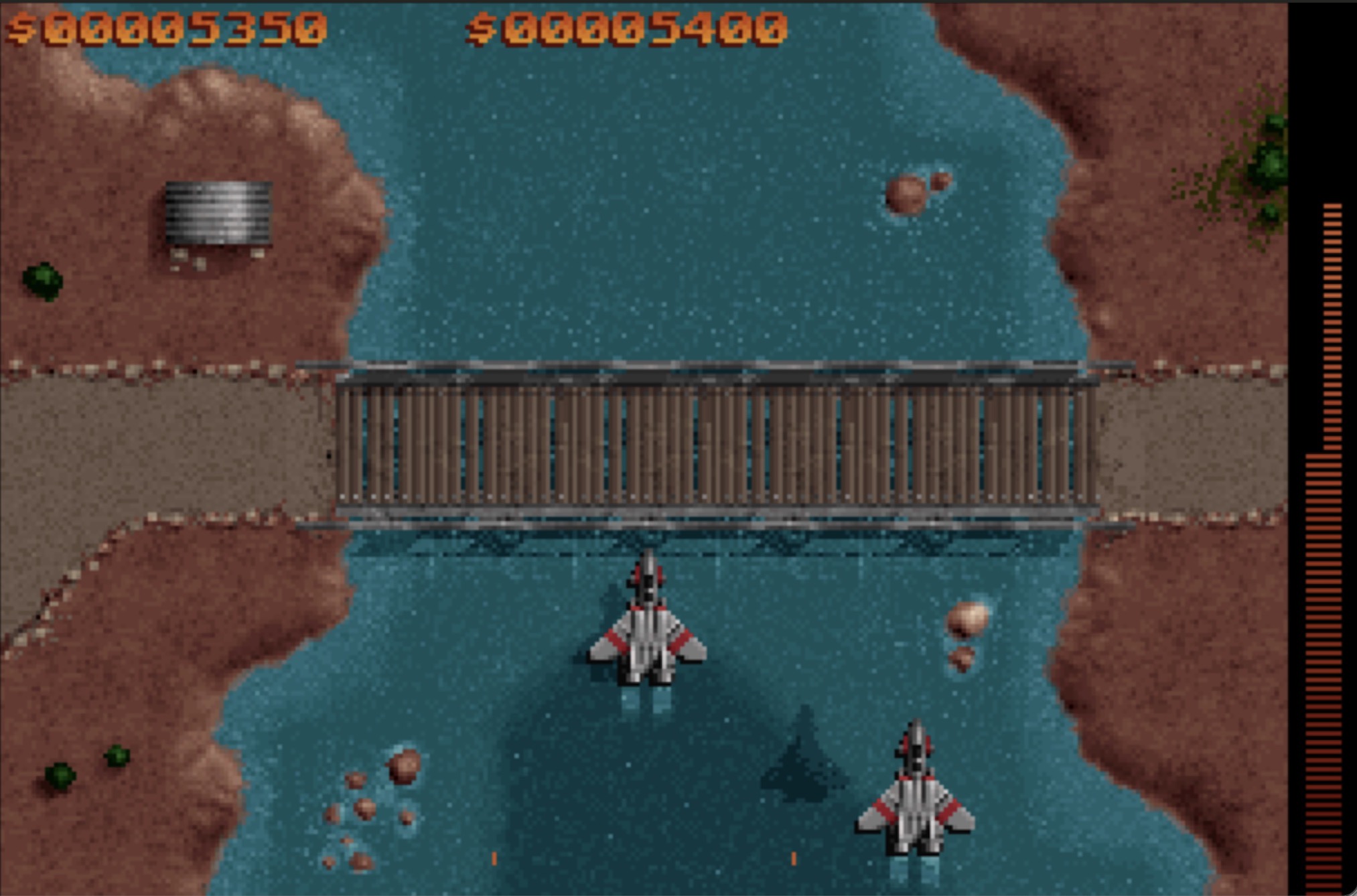
The rendering was surprisingly straightforward. The original code draws the player ship with engine flames and a shadow. For two players, this becomes a simple loop:
/* --- Render both ships --- */
for ( p = 0; p < 2; p++ )
{
   if ( draw_player[p] )
   {
      FLAME_Down ( player_cx[p] + -o_engine[ playerpic[p] ] - 3,
                   player_cy[p] + 15, 4, gl_cnt % 2 );
      FLAME_Down ( player_cx[p] + o_engine[ playerpic[p] ] - 2,
                   player_cy[p] + 15, 4, gl_cnt % 2 );
      GFX_PutSprite ( GLB_GetItem ( curship [ playerpic[p] + g_flash ] ),
                       playerx[p], playery[p] );
   }
}
Both ships use the same sprite set (the ship banks left/right based on horizontal movement), and each gets its own engine flame effect and shadow.
HUD: Split Score Display
The original HUD shows the score at a fixed position. With two players, Player 1’s score displays in its original position (center-right), while Player 2’s score is shown on the left. Shield bars are similarly repositioned — P1 keeps the original border positions, P2 gets mirrored positions on the opposite side.
Player 2 Auto-Initialization
Player 2 is always present — there’s no menu toggle. When the game starts, WINDOWS.C automatically initializes Player 2 with the same difficulty settings as Player 1, starter weapons, and a default name:
cur_player = 1;
OBJS_Clear();
memset ( &plr[1], 0, sizeof ( PLAYEROBJ ) );
plr[1].sweapon  = EMPTY;
plr[1].diff[0]  = plr[0].diff[0];
strcpy ( plr[1].name, "Player 2" );
strcpy ( plr[1].callsign, "P2" );
OBJS_Add ( S_FORWARD_GUNS );
OBJS_Add ( S_ENERGY );
OBJS_Add ( S_ENERGY );
OBJS_Add ( S_ENERGY );
plr[1].score = 10000;
cur_player = 0;
What Changed: The Numbers
The two-player modification touched 15 source files with roughly 1,800 lines changed. The biggest changes were in:
- RAP.C (326 lines) — Game loop, stats display, death/respawn logic
- INPUT.C (289 lines) — Dual input handling, WASD keybinds, per-player movement state
- OBJECTS.C (209 lines) — Separate inventory linked lists per player
- SHOTS.C (200 lines) — Weapon fire origins from correct player position
- WINDOWS.C (102 lines) — P2 initialization, respawn between waves, hangar screen
- LOADSAVE.C (84 lines) — Per-player save file tracking
- ESHOT.C (70 lines) — Enemy shot targeting nearest player, collision with both
- ENEMY.C (38 lines) — Sprite-vs-player collision for both ships
- BONUS.C (52 lines) — Bonus pickups apply to current player
The Design Philosophy
The key insight was that Raptor’s global-variable architecture, while generally considered bad practice, actually made the two-player conversion possible. Because every subsystem reads from the same globals, changing those globals to arrays and setting an index before each call was enough to make the entire system player-aware. A more „properly“ architected game with encapsulated state might have actually been harder to modify this way.
The cur_player pattern is essentially a poor man’s context switch — the game „becomes“ each player in turn, running the same code paths with different state. It’s not elegant, but it’s effective and minimally invasive for a 30-year-old codebase.
Two ships, one shared screen, same classic Raptor gameplay — compiled from source on a Mac and running in DOSBox-X.