When reverse-engineering a legacy BIOS — in my case a 1994 Compaq Deskpro EISA BIOS — you eventually reach the limits of what static analysis in Ghidra can tell you. You need to see what the hardware actually does at runtime: what values the chipset registers hold, how CMOS is configured, what the EISA slot IDs are. But how do you debug a 30-year-old machine that has no JTAG, no debug header, and no cooperation from the BIOS itself?
The answer is BREAD (BIOS Real-mode Embedded Analysis & Debugging) — an open-source project by Davidson Francis that turns a serial port into a full GDB stub for real-mode x86 hardware. In this article I’ll explain how I adapted BREAD for the Compaq BIOS and built a chipset register dump pipeline around it.
What is BREAD?
BREAD consists of two components:
- dbg.asm — A ~1.2 KB 16-bit real-mode debugger stub written in NASM assembly, injected directly into the BIOS ROM image. It hooks INT1 (single-step/debug exception), configures the UART at 115200 baud on COM1, and implements a state machine that responds to commands over serial: single-step, continue, read/write memory, set/remove hardware breakpoints and watchpoints via x86 debug registers (DR0–DR7).
- bridge — A C program running on a modern host (Linux/macOS) that acts as a protocol translator between the serial line and GDB’s Remote Serial Protocol (RSP). It listens for GDB connections on TCP port 1234, translates GDB commands (
g,m,M,s,c,Z,z,P,?) into BREAD’s compact binary serial protocol, and relays responses back.
The result: you can use standard GDB to single-step through BIOS POST on real hardware, inspect registers, read and write arbitrary memory, and set hardware breakpoints — all through a serial cable.
How the Injection Works
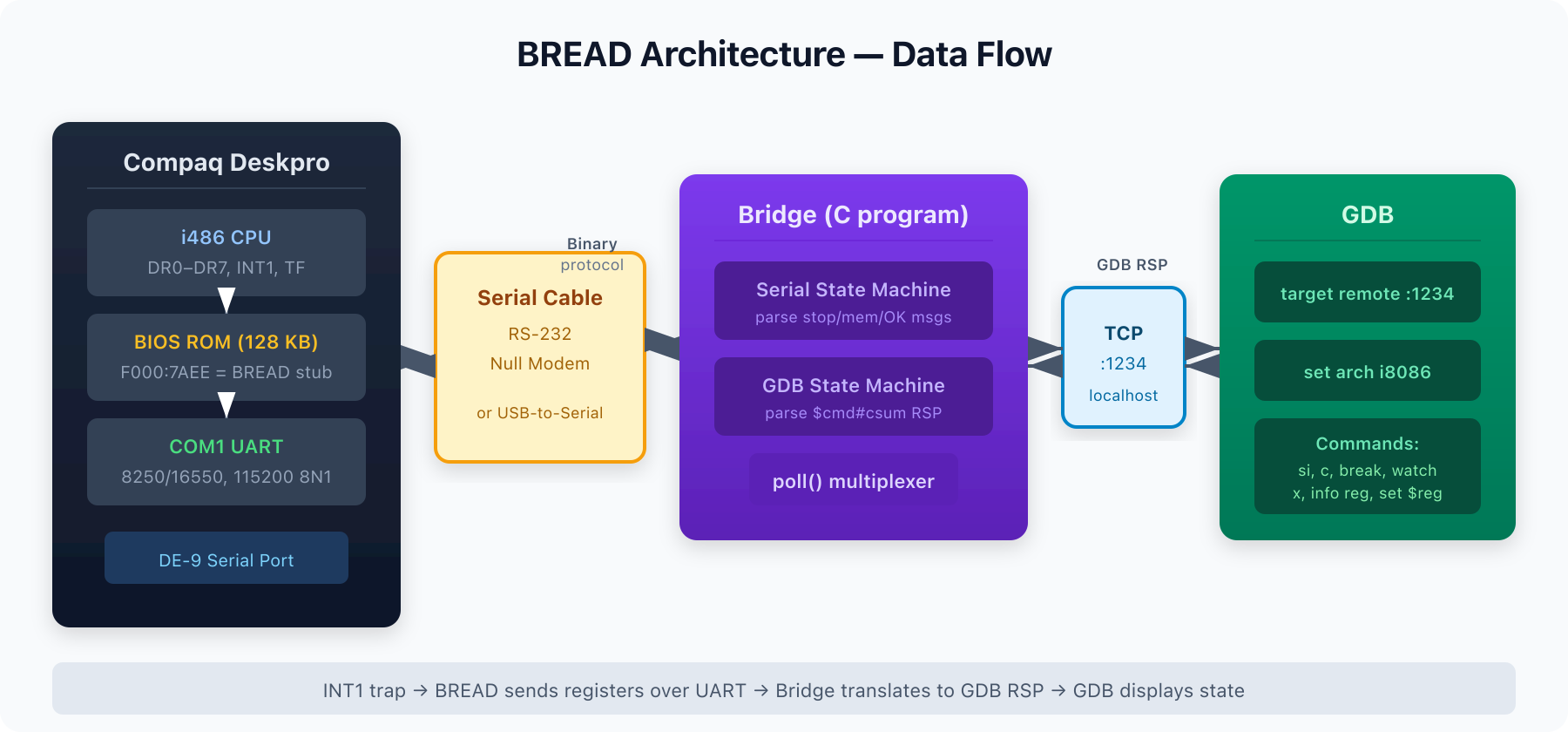
The Compaq BIOS is a 128 KB ROM image mapped at physical address 0xE0000–0xFFFFF. The injection process (automated by inject-bread.sh) works in three steps:
- Find a hook point. After the BIOS has initialized the chipset and set up a stack (at F000:1719), there’s a call to a CMOS checksum verification routine at F000:1721 (
E8 0A A8=call BF2E). This 5-byte instruction gets replaced with a far call to our debugger:9A EE 7A 00 F0=call far F000:7AEE. - Place the debugger. The BREAD binary (
dbg.bin, ~1224 bytes) is written into a 1298-byte region of 0xFF fill at file offset 0x17AEE (F000:7AEE). This is unused space in the original ROM. - Fix the checksum. The F000 segment must sum to 0x00 mod 256. The script calculates the current sum and writes an adjustment byte right after the debugger code.
When the Compaq powers on, it runs through early chipset init and memory sizing normally. At checkpoint 0x19, instead of verifying the CMOS checksum, it far-calls into BREAD. BREAD saves all registers, initializes the UART, hooks INT1 into the IDT, enables the Trap Flag, and returns to the BIOS. From that point on, every single instruction triggers INT1, which sends the full CPU state over serial.
The Bridge: Serial ↔ GDB Translation
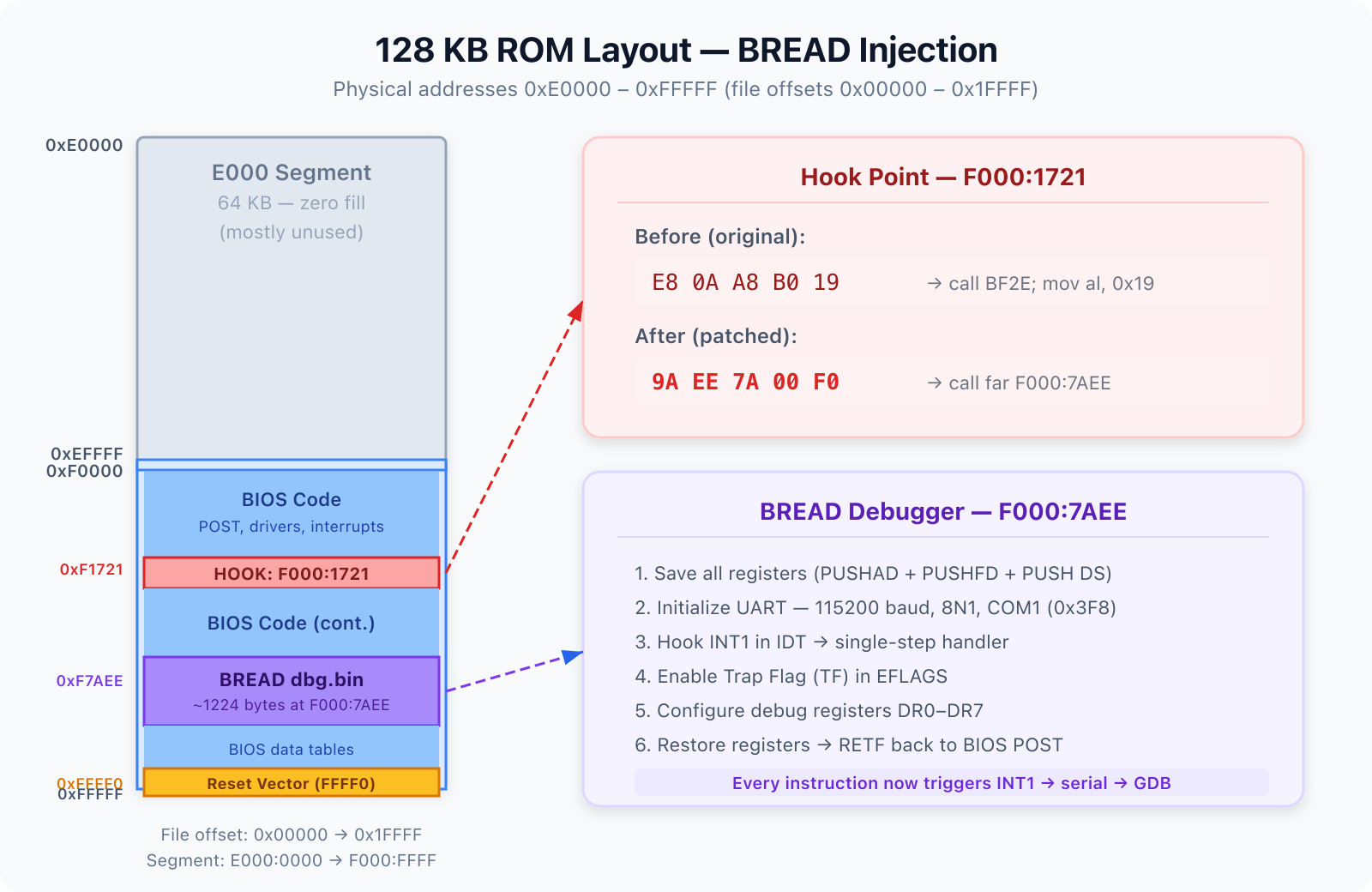
The bridge program (tools/bread/bridge) is the glue between your GDB session and the hardware. It operates in two modes:
- Device mode (default): Connects directly to a serial device like
/dev/ttyUSB0at 115200 baud, 8N1. - Socket mode (
-s): For QEMU testing, listens on TCP port 2345 for a serial connection.
The bridge uses poll() to multiplex between the serial and GDB file descriptors — no threads needed. Its core is two state machines:
- The GDB state machine parses the
$command#checksumRSP format and dispatches to handlers for register reads (g), memory reads/writes (m/M), single-step (s), continue (c), breakpoints (Z/z), register writes (P), and halt reason (?). - The Serial state machine processes responses from the hardware: stop data (all registers + stop reason + saved instructions), memory dump data, and OK confirmations.
A clever detail: in interrupt-based mode (non-polling), BREAD overwrites the instruction at the current EIP with HLT; JMP $-1 to keep the CPU cool while waiting for the next command. The bridge patches these bytes back with the saved originals when sending memory to GDB, so GDB always sees the real code.
Chipset Register Dump Pipeline
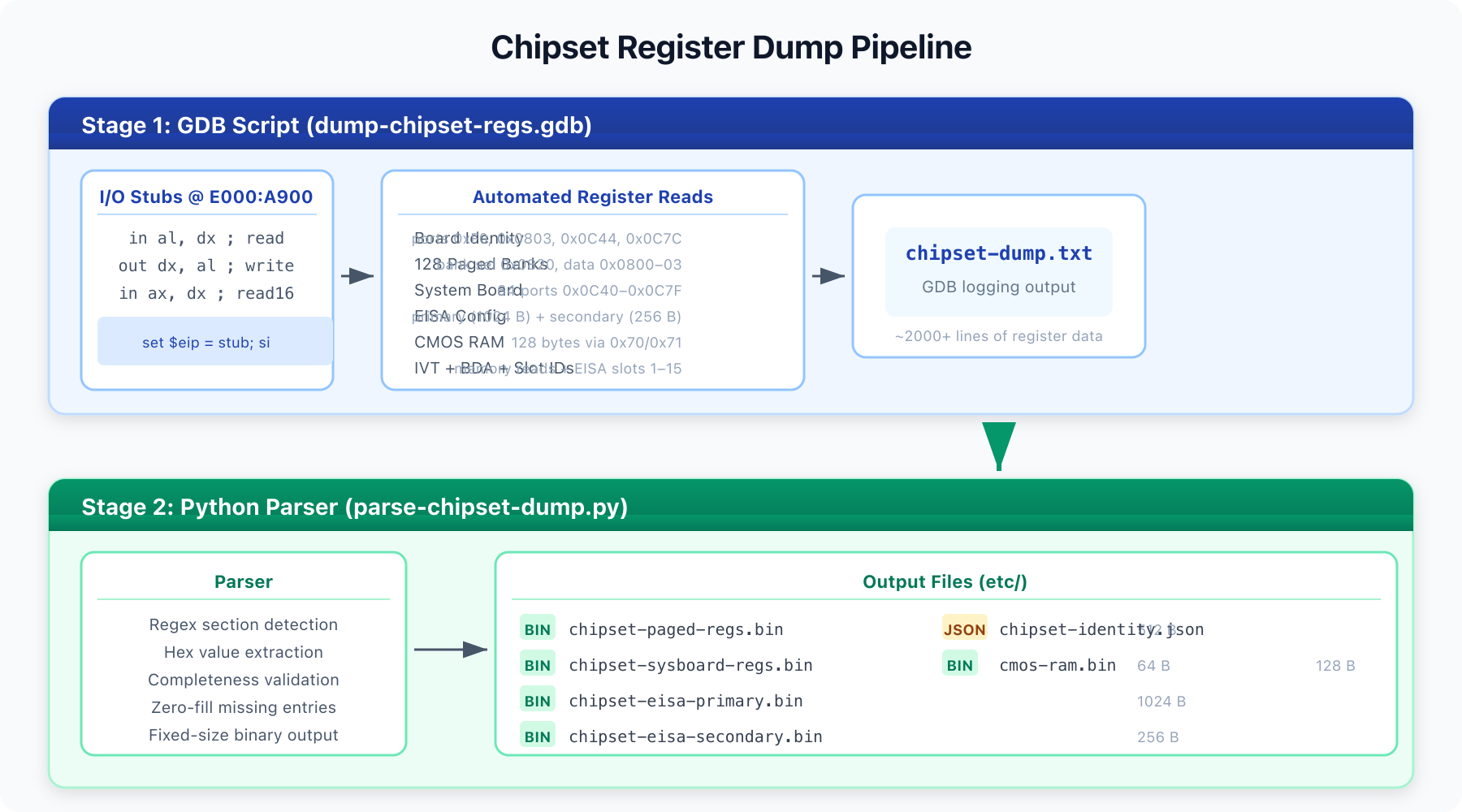
Once BREAD gives us GDB access to the live hardware, we can do more than just step through code. I built a two-stage pipeline to dump the entire chipset configuration:
Stage 1: GDB Script (dump-chipset-regs.gdb)
This GDB script injects tiny I/O stubs into RAM (at E000:A900) — literally just in al, dx and out dx, al followed by NOPs — then uses GDB’s set $eip + si to execute them. This lets us perform arbitrary I/O port reads and writes through GDB, without needing the BIOS to cooperate.
The script dumps:
- Board identity registers — ports 0xF0 (ISA/EISA variant), 0x0803 (board revision), 0x0C44 (chipset revision), 0x0C7C (board ID)
- 128 paged register banks — the Compaq chipset uses a bank-select register at port 0x0820 with 4 data ports at 0x0800–0x0803, giving 512 bytes of configuration
- System board registers — 64 ports from 0x0C40 to 0x0C7F
- EISA primary config — 256 indices × 4 bytes via index port 0x0C94 and data ports 0x0C98–0x0C9B
- EISA secondary config — 256 indices via ports 0x0CD4/0x0CD5
- Memory window registers — ports 0x0878 and 0x087A
- CMOS RAM — all 128 bytes via ports 0x70/0x71 (with NMI disabled)
- EISA slot IDs — slots 1–15
- IVT and BDA — interrupt vector table and BIOS Data Area from RAM
Everything is logged to etc/chipset-dump.txt via GDB’s logging facility.
Stage 2: Python Parser (parse-chipset-dump.py)
The second stage parses the text dump into structured binary files:
chipset-paged-regs.bin— 512 bytes (128 banks × 4)chipset-sysboard-regs.bin— 64 byteschipset-eisa-primary.bin— 1024 bytes (256 × 4)chipset-eisa-secondary.bin— 256 byteschipset-identity.json— board identity as structured JSONcmos-ram.bin— 128 bytes
The parser validates completeness (warns if any section has fewer entries than expected) and produces zero-filled gaps so the binary files have fixed, predictable sizes — ready for comparison tools or further automated analysis.
Symbol Support
BREAD also includes symbolify.py, which takes a simple text file of address label pairs and generates an ELF debug symbol file. In GDB you load it with add-symbol-file compaq.elf 0, and suddenly you can set breakpoints by name: break post_stack_setup, break int19_bootstrap. I maintain a growing symbol table (compaq-symbols.txt) with known entry points from the Ghidra disassembly — reset vector, POST sequence, interrupt handlers, and key subroutines.
Practical Workflow
# 1. Build the debugger stub
cd tools/bread
nasm -fbin dbg.asm -o dbg.bin -DUART_POLLING
make bridge

# 2. Inject into the ROM image
./inject-bread.sh ../../etc/compaq-dumped-flash.bin ../../etc/compaq-bread.bin

# 3. Flash the patched ROM to the Compaq's BIOS chip

# 4. Connect serial cable (COM1 → USB-to-serial adapter)

# 5. Start the bridge
./bridge -d /dev/ttyUSB0

# 6. Power on the Compaq — wait for "Single-stepped, you can now connect GDB!"

# 7. Connect GDB
gdb -q -x gdbinit-bread

# 8. (Optional) Dump chipset registers
source ../../tools/bread/dump-chipset-regs.gdb
Why This Matters
This toolchain solves a fundamental problem in retro-computing and BIOS reverse engineering: understanding what the hardware is actually doing during POST, without any documentation from the original manufacturer. The Compaq Deskpro’s proprietary chipset has no public datasheet. By dumping every accessible register at a known point in the boot process, we can:
- Map which I/O ports the chipset actually responds to
- Understand the memory controller configuration (row/column addressing, timing, interleave)
- Decode the EISA bus configuration
- Compare register states between different boot stages
- Verify that BIOS patches (like the non-parity RAM patches) produce the expected chipset configuration
BREAD turns any machine with a serial port and an x86 CPU into a debuggable target. For anyone doing BIOS-level work on vintage hardware, it’s an indispensable tool.
Credits
BREAD was created by Davidson Francis and released under the MIT License. The chipset dump scripts and Compaq-specific injection tooling were built on top of his work.