What if you built a complete operating system from scratch — no libraries, no existing kernel, no abstraction layers? That’s exactly what Rainbow-OS is: a self-built 32-bit operating system for the Intel 486 architecture, emulated with QEMU.
What is Rainbow-OS?
Rainbow-OS is a hobby project that demonstrates how a modern operating system works at the lowest level. It consists of a hand-written bootloader in NASM assembly and a kernel in C — completely without stdlib, without Linux, without any OS abstractions. Everything runs on bare metal (or QEMU’s emulation of it).
Why Build Your Own OS?
Most developers work with operating systems every day without ever understanding what’s really going on underneath. Rainbow-OS changes that. Every line of code — from the first boot sector to the filesystem — was written and understood by hand. The project is an intense journey through:
- x86 assembly and Protected Mode
- Hardware interrupts and the 8259A PIC
- Memory management at the frame level
- Filesystem structures (FAT12)
- SVGA graphics with bank switching
Technology Stack
| Component | Technology |
|---|---|
| Bootloader | NASM Assembly (Stage 1 + Stage 2) |
| Kernel | C (freestanding, no stdlib) |
| Target Architecture | Intel 486, 32-bit Protected Mode |
| Emulator | QEMU (-cpu 486, -m 32, -vga cirrus) |
| Build System | CMake with i686-elf cross-compiler |
| Development Setup | MacBook M1 + CLion + GDB Remote |
Architecture: The Boot Process
When the system starts, a multi-stage process runs — every part implemented by hand:
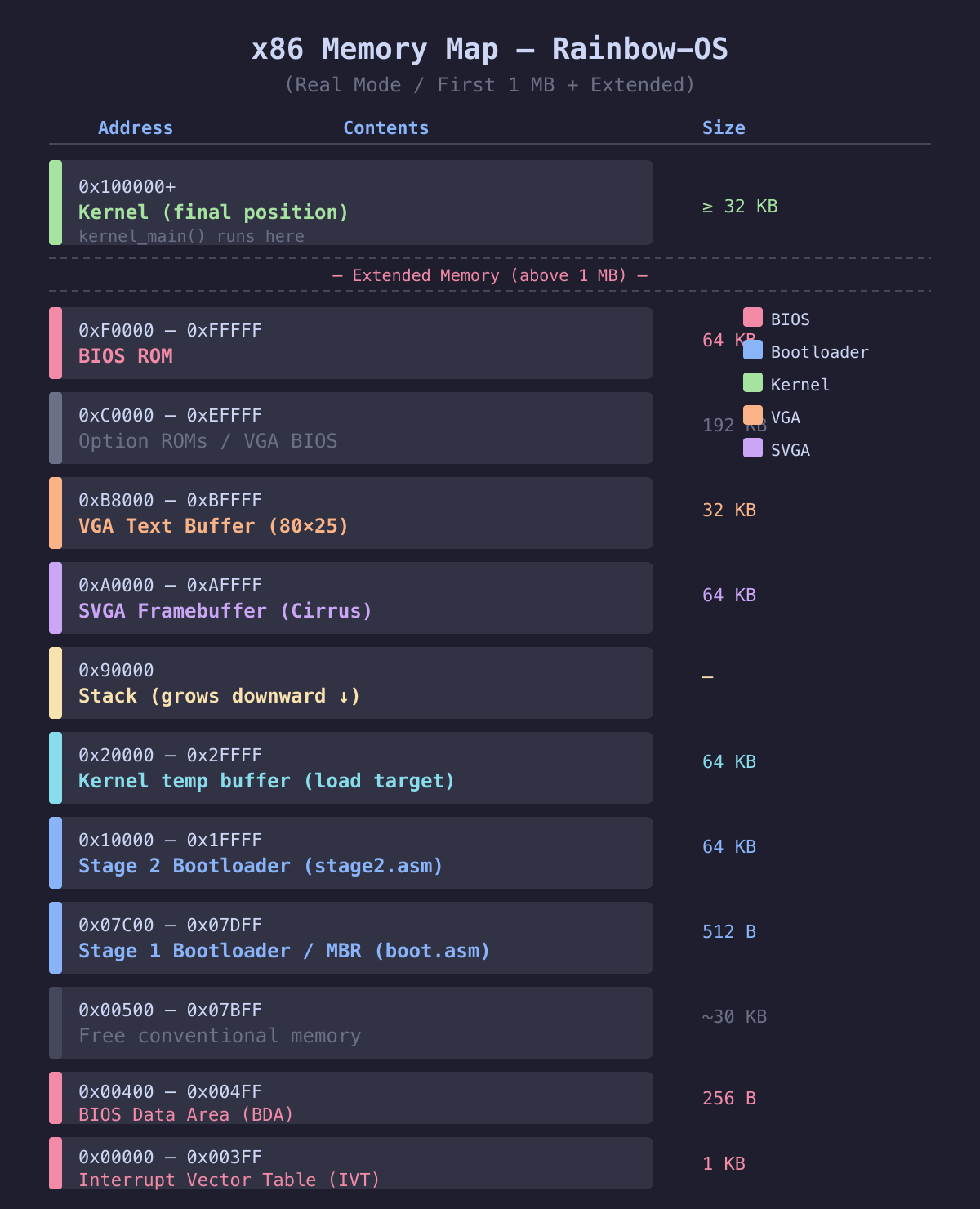
- Stage 1 (boot.asm, 512 bytes) — The MBR. Enables A20, saves the boot drive, loads Stage 2.
- Stage 2 (stage2.asm) — Sets up the GDT, switches to 32-bit Protected Mode, copies the kernel to address 0x100000.
- Kernel Entry (entry.asm) — Sets up the stack and calls
kernel_main(). - Kernel (kernel.c) — Initializes all subsystems: Serial, VGA, PIC, IDT, PMM, Paging, Ramdisk, SVGA, Keyboard, Shell.
The 9 Milestones
The project was built incrementally across 9 milestones — each one building on the previous:
| Milestone | Description |
|---|---|
| M1 | 2-stage bootloader with Protected Mode switch |
| M2 | VGA text mode (80×25 characters) |
| M3 | Serial console (COM1 logging for debugging) |
| M4 | PS/2 keyboard input via IDT and PIC |
| M5 | Interactive shell with commands |
| M6 | Physical memory manager + paging (32 MB) |
| M7 | FAT12 filesystem on a 64 KB ramdisk |
| M8 | SVGA graphics with Cirrus GD5446 (640×480, 8bpp) |
| M9 | HDD boot support (16 MB image) |
The Shell: Direct Hardware Control
The system boots into a minimalist shell. Available commands: help, version, meminfo, ls, cat, gfx (switch to SVGA graphics mode), clear, and reboot.
Technical Highlights
SVGA Bank Switching: The Cirrus GD5446 uses a 64 KB window at 0xA0000. To address all 307,200 pixels in 640×480 mode, the GR9 register is used for bank selection — a technique straight out of the DOS era.
Freestanding C: The entire kernel runs without any C standard library. Even basic functions like memset, memcpy, and strcmp are implemented in a custom lib/string.c.
Cross-Compilation on M1: Developed on an Apple Silicon MacBook using an i686-elf-gcc cross-compiler. QEMU emulates the entire x86 hardware via TCG (no KVM).
Source Code
The full source code is available on GitHub:
Conclusion
Rainbow-OS is a complete, bootable operating system — built out of pure curiosity and the desire to truly understand every layer of computing. From the first 512 bytes of the boot sector to the SVGA graphics: every line of code was written deliberately and understood completely.
If you want to understand how a computer really works, there is no better school than building one yourself.