Jira’s issue History tab tells you what changed, but
reading it is a chore: old and new values sit in two plain columns and you have to
spot the difference yourself. For a one-word status change that’s fine. For an
edited Description with a dozen tweaked sentences, it’s painful. So I built
a small Chrome extension to fix it.
What it does
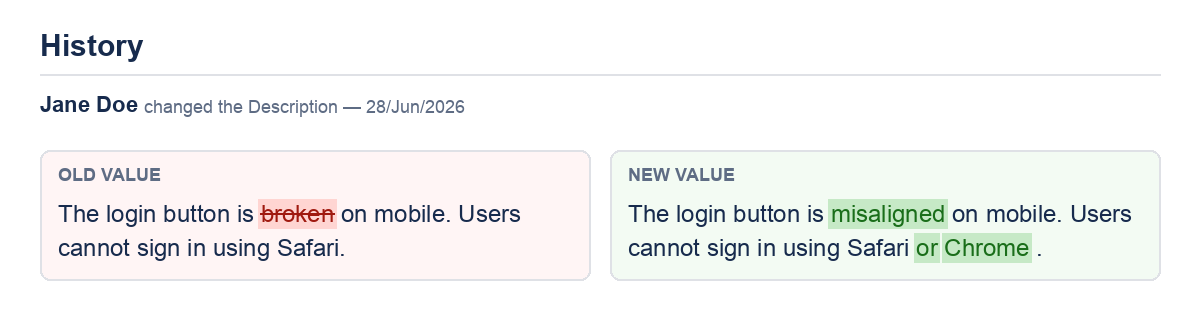
- Word-level colored diff in the History tab. Text fields
(Description, Summary, Environment, comments, and any long value) are rendered
side by side with removed words struck through in red and added words highlighted
in green — so a changed sentence reads at a glance. - Floating layout toggles to hide or show the issue sidebar and
the details module, giving you a wider, distraction-free view of the ticket. - Persistent settings. Your toggle choices are stored and
re-applied on every issue page, even as Jira re-renders panels via AJAX.
How it works
It’s a Manifest V3 extension built around a single content script. The History
tab loads its rows asynchronously when you click it, so a MutationObserver
watches the DOM and enhances the change rows as soon as they appear. The diff itself
is a classic longest-common-subsequence pass over word tokens, with a size guard that
falls back to a coarser line-level diff for very large fields so the page never
freezes.
The layout toggles are just as simple: two floating buttons flip the display of
the relevant Jira elements and save the state through the extension’s storage, so the
view you prefer survives a reload.
Lessons learned
The trickiest part wasn’t the diff algorithm — it was Jira’s asynchronous
rendering. Anything you inject can be wiped out the moment Jira refreshes a panel, so
every enhancement has to be idempotent and re-applied on DOM changes. Tagging
processed rows and re-running on mutations keeps it robust without reprocessing the
whole page on every tick.
The extension is bundled as a versioned zip for easy installation and released on
GitHub. It’s a small tool, but it turns the History tab from something you squint at
into something you actually read.
Update: from a reading aid to a workflow tool
Since the first release the extension has grown well beyond the History tab.
It now removes two of the most repetitive clicks in a developer’s Jira day —
creating a branch and moving a ticket across the board — and it runs on
Firefox as well as Chrome.
Create a GitLab branch straight from the issue
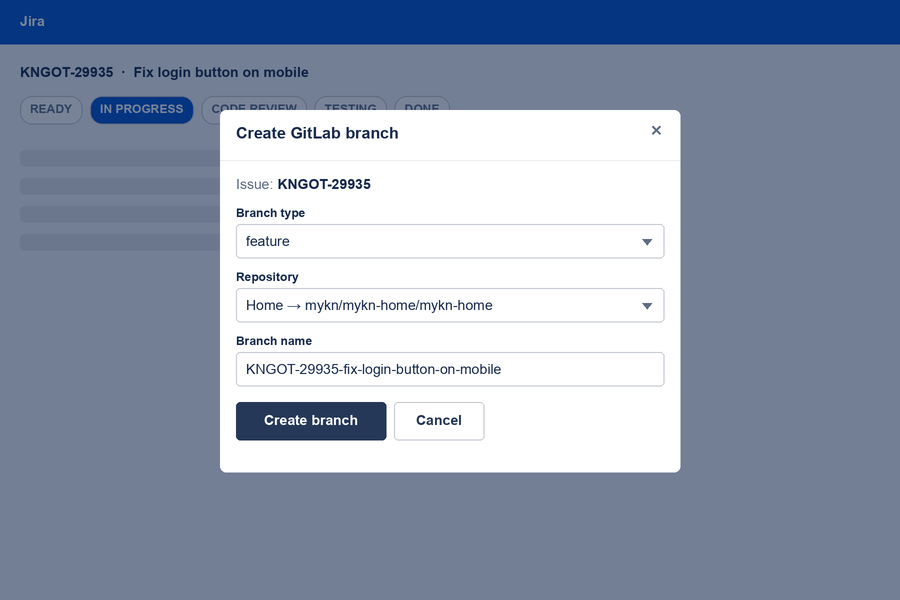
On any issue page a Create Branch button opens a small modal
that does the tedious part for you. It reads the issue’s Summary and
Component(s) through the Jira REST API, maps each component to its GitLab
repository, and prefills a tidy branch name in the form
KEY-slugified-summary. You pick the branch type
(feature or hotfix), confirm the target repository, and
the extension creates the branch off the repository’s auto-detected default branch
via the GitLab API — then hands you a direct link to it. No more copying the
issue key, guessing the repo, or hand-typing branch names.
KEY-summary branch name.A workflow-state switcher in the issue header
A row of state pills now sits at the top of every issue. The pill for the
current status is highlighted; clicking another one performs the matching Jira
workflow transition immediately and shows an inline success or error message.
States that aren’t reachable from the current status are greyed out, so you can
see at a glance where a ticket can go next. The default set follows our board’s
Ready → Done columns, and other teams can load their own board’s
columns from the options page.
Now on Firefox too
The same runtime code ships to both browsers — only the manifest differs.
A dedicated Firefox manifest adds the Gecko-specific settings and a background
script fallback, so there were no JavaScript changes to maintain: the code already
used the callback-style chrome.* APIs that Firefox supports.
Configurable, with tokens kept local
All of this is driven by an options page: GitLab and Jira URLs, personal access
tokens, component→repository mappings, and the board to pull workflow states
from. Tokens live only in the extension’s local storage and are never sent
anywhere except the two APIs they’re meant for.
What started as a way to make the History tab readable has turned into a small
cockpit for the parts of Jira I touch every day.