A small but disproportionately satisfying upgrade to the Rainbow-OS shell: the
Tab key now does something useful. Type edit hel, press
Tab, and it completes to edit hello.c. It is the kind of quality-of-life
feature you stop noticing the moment it exists — and badly miss when it’s
gone.
Two kinds of completion
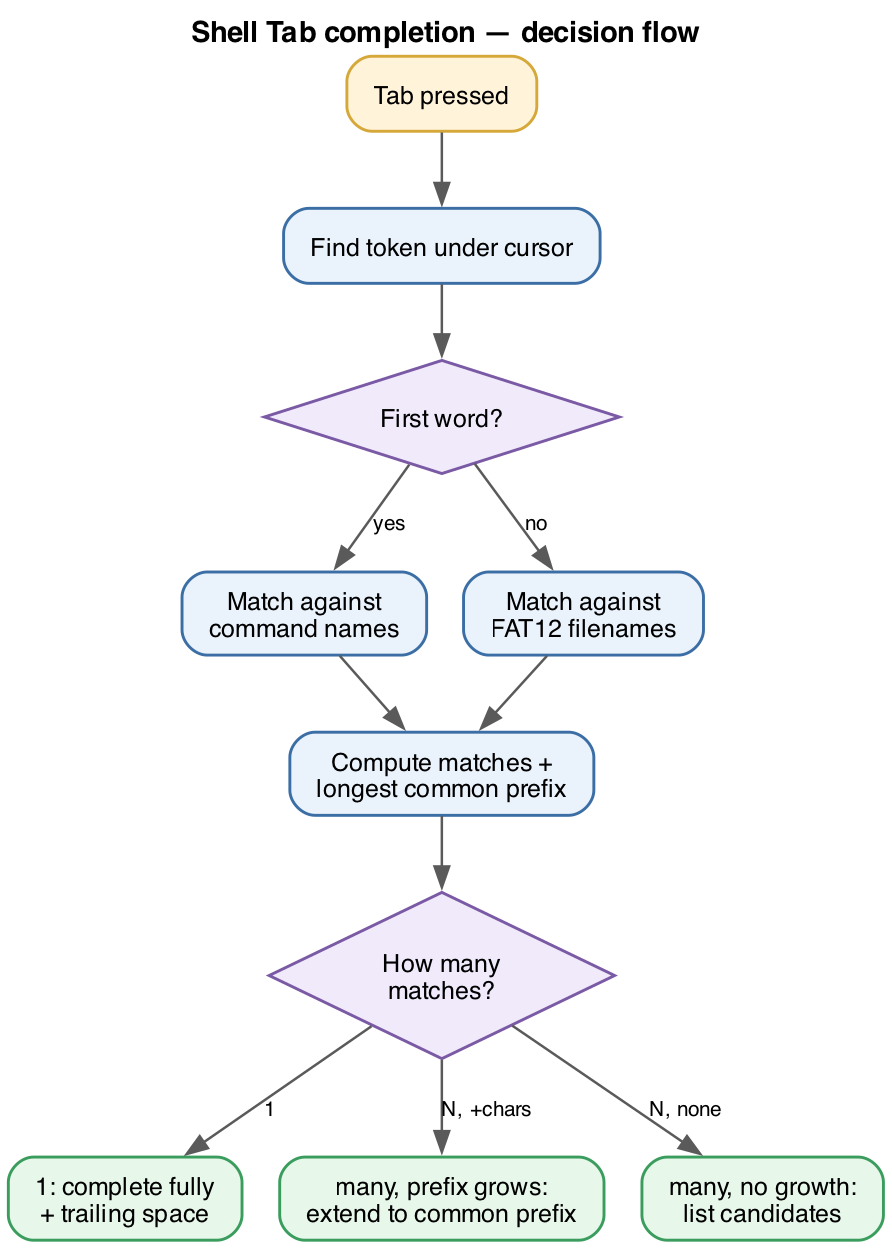
The shell looks at where the cursor is in the command line and decides what
you’re trying to complete:
- If you’re still on the first word, it completes against the
shell’s built-in command names (edit,cat,
basic,asteroids, and so on). - If there’s already a space, it completes the last token against the
files in the FAT12 root directory, read via
fat12_list_root().
Longest common prefix, then a listing
The logic mirrors how a real shell behaves. It scans the candidate list for
everything matching the typed prefix and tracks the longest common
prefix of all matches:
- One match → complete it fully and add a trailing space,
ready for the next argument. - Several matches that share more characters → extend the
input as far as the common prefix goes (soba+ Tab becomes
basic). - Several matches with nothing more in common → print the
candidates and redraw the prompt with what you’d typed, so you can keep going.
For example, with files hello.c and hello.txt both
present, edit hel + Tab stops at edit hello. — the
shared prefix — and waits for you to type c or t.
Typing c on its own and hitting Tab, where cat,
cc, and clear all match, lists all three.
Implementation notes
Because completion only ever extends the current token, the common
case needs no screen redraw at all — it just appends the extra characters
and echoes them, exactly like normal typing. Only the ambiguous „here are your
options“ case reprints the prompt. The whole feature is a single self-contained
function, shell_complete(), wired into the keyboard handler where the
Tab key used to be silently ignored.
It’s a reminder that an operating system isn’t just kernels and drivers
— it’s also the dozens of tiny interactions that make it feel like a place
you’d actually want to type commands.